CKS Exam Preparation Material | Certified Kubernetes Security Specialist (CKS)

Prepare for the CKS with reliable study materials, practice questions, and key exam insights.

Prepare for the CKS Certified Kubernetes Security Specialist (CKS) exam with CertQueen's independently developed study resources. Review important concepts, practice scenario-based questions, and use clear explanations to identify areas that require further study.

Question#1

SIMULATION
Service is running on port 389 inside the system, find the process-id of the process, and stores the names of all the open-files inside the /candidate/KH77539/files.txt, and also delete the binary.

A. The ss command is the replacement of the netstat command.
Now let’s see how to use the ss command to see which process is listening on port 22:
root# ss -ltnup 'sport = :22'
Netid State Recv-Q Send-Q Local Address:Port Peer Address:Port
tcp LISTEN 0 128 0.0.0.0:22 0.0.0.0:* users:("sshd",pid=575,fd=3))

Question#2

SIMULATION
Create a PSP that will only allow the persistentvolumeclaim as the volume type in the namespace restricted.
Create a new PodSecurityPolicy named prevent-volume-policy which prevents the pods which is having different volumes mount apart from persistentvolumeclaim.
Create a new ServiceAccount named psp-sa in the namespace restricted.
Create a new ClusterRole named psp-role, which uses the newly created Pod Security Policy prevent-volume-policy
Create a new ClusterRoleBinding named psp-role-binding, which binds the created ClusterRole psp-role to the created SA psp-sa.
Hint:
Also, Check the Configuration is working or not by trying to Mount a Secret in the pod maifest, it should get failed.
POD Manifest:
apiVersion: v1
kind: Pod
metadata:
name:
spec:
containers:
- name:
image:
volumeMounts:
- name:
mountPath:
volumes:
- name:
secret:
secretName:

A. apiVersion: policy/v1beta1
kind: PodSecurityPolicy
metadata:
name: restricted
annotations:
seccomp.security.alpha.kubernetes.io/allowedProfileNames: 'docker/default,runtime/default'
apparmor.security.beta.kubernetes.io/allowedProfileNames: 'runtime/default'
seccomp.security.alpha.kubernetes.io/defaultProfileName: 'runtime/default'
apparmor.security.beta.kubernetes.io/defaultProfileName: 'runtime/default' spec:
privileged: false
# Required to prevent escalations to root. allowPrivilegeEscalation: false
# This is redundant with non-root + disallow privilege escalation,
# but we can provide it for defense in depth. requiredDropCapabilities:
- ALL
# Allow core volume types.
volumes:
- 'configMap'
- 'emptyDir'
- 'projected'
- 'secret'
- 'downwardAPI'
# Assume that persistentVolumes set up by the cluster admin are safe to use. - 'persistentVolumeClaim'
hostNetwork: false
hostIPC: false
hostPID: false
runAsUser:
# Require the container to run without root privileges. rule: 'MustRunAsNonRoot'
seLinux:
# This policy assumes the nodes are using AppArmor rather than SELinux. rule: 'RunAsAny'
supplementalGroups:
rule: 'MustRunAs'
ranges:
# Forbid adding the root group. - min: 1
max: 65535
fsGroup:
rule: 'MustRunAs'
ranges:
# Forbid adding the root group. - min: 1
max: 65535
readOnlyRootFilesystem: false

Question#3

Pods with label environment: stage, in any namespace

A. 


Reference: https://kubernetes.io/docs/concepts/services-networking/network-policies/

Question#4

2 Ensure that the client-cert-auth argument is set to true

A. worker1 $ vim /var/lib/kubelet/config.yaml
anonymous:
enabled: true #Delete this
enabled: false #Replace by this
authorization:
mode: AlwaysAllow #Delete this
mode: Webhook #Replace by this
worker1 $ systemctl restart kubelet. # To reload kubelet config
ssh to master1
master1 $ vim /etc/kubernetes/manifests/kube-apiserver.yaml - -- authorization-mode=Node,RBAC
master1 $ vim /etc/kubernetes/manifests/etcd.yaml
- --client-cert-auth=true
Explanation
ssh to worker1
worker1 $ vim /var/lib/kubelet/config.yaml
apiVersion: kubelet.config.k8s.io/v1beta1
authentication:
anonymous:
enabled: true #Delete this
enabled: false #Replace by this
webhook:
cacheTTL: 0s
enabled: true
x509:
clientCAFile: /etc/kubernetes/pki/ca.crt
authorization:
mode: AlwaysAllow #Delete this
mode: Webhook #Replace by this
webhook:
cacheAuthorizedTTL: 0s
cacheUnauthorizedTTL: 0s
cgroupDriver: systemd
clusterDNS:
- 10.96.0.10 clusterDomain: cluster.local cpuManagerReconcilePeriod: 0s evictionPressureTransitionPeriod: 0s fileCheckFrequency: 0s healthzBindAddress: 127.0.0.1 healthzPort: 10248 httpCheckFrequency: 0s imageMinimumGCAge: 0s
kind: KubeletConfiguration
logging: {}
nodeStatusReportFrequency: 0s
nodeStatusUpdateFrequency: 0s
resolvConf: /run/systemd/resolve/resolv.conf
rotateCertificates: true
runtimeRequestTimeout: 0s
staticPodPath: /etc/kubernetes/manifests
streamingConnectionIdleTimeout: 0s
syncFrequency: 0s
volumeStatsAggPeriod: 0s
worker1 $ systemctl restart kubelet. # To reload kubelet config
ssh to master1
master1 $ vim /etc/kubernetes/manifests/kube-apiserver.yaml
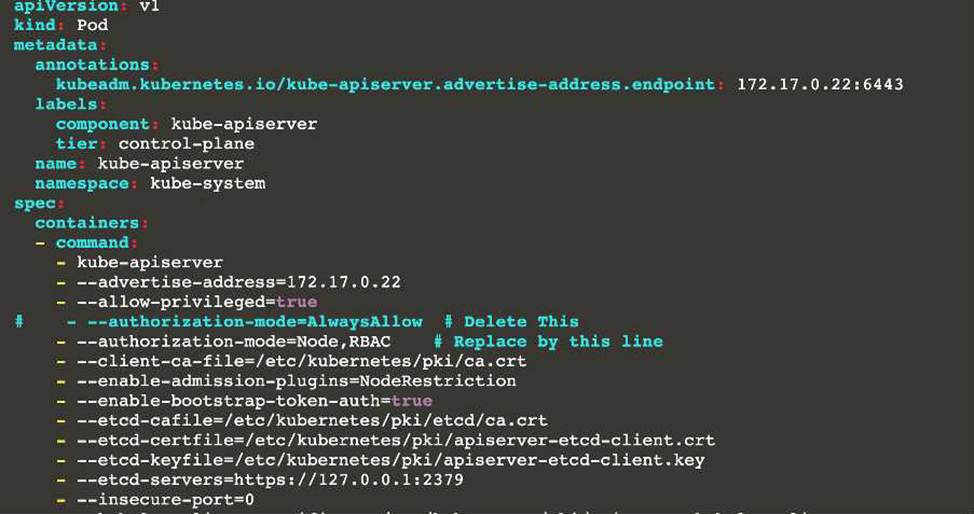


master1 $ vim /etc/kubernetes/manifests/etcd.yaml
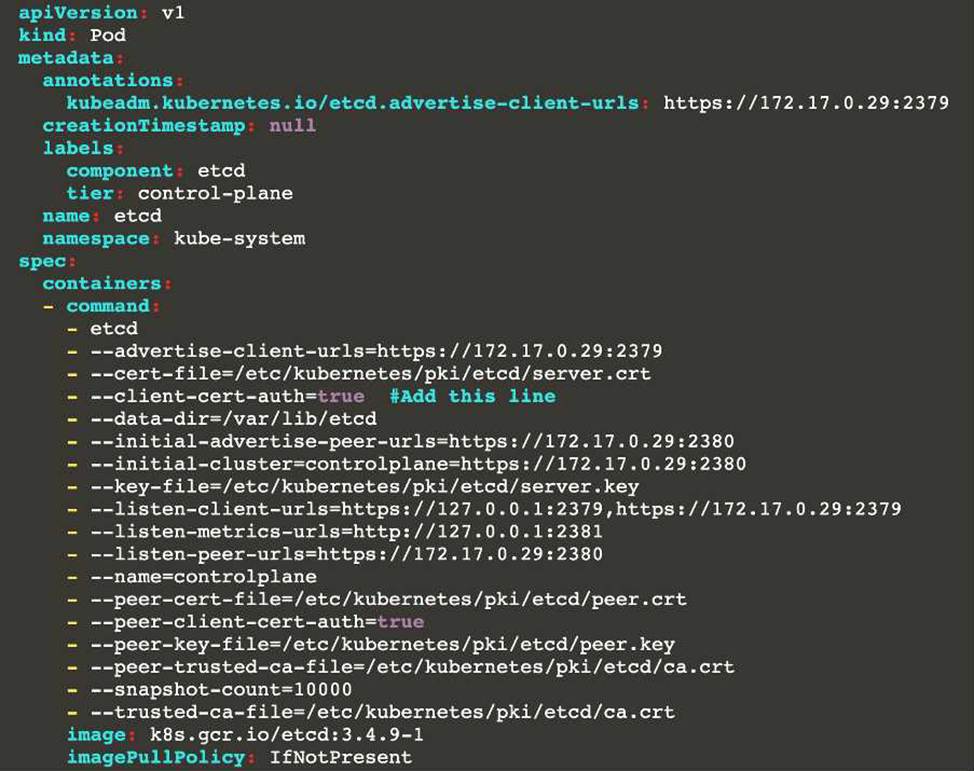


Reference:
kubelet parameters: https://kubernetes.io/docs/reference/command-line-tools-reference/kubelet/
kubeapi parameters: https://kubernetes.io/docs/reference/command-line-tools-reference/kube-apiserver/
etcd parameters: https://kubernetes.io/docs/tasks/administer-cluster/configure-upgrade-etcd/


Question#5

SIMULATION
Documentation dockerd
You must connect to the correct host . Failure to do so may result in a zero score.
[candidate@base] $ ssh cks000037
Task
Perform the following tasks to secure the cluster node cks000037:
Remove user developer from the docker group.
Do not remove the user from any other group.
Reconfigure and restart the Docker daemon to ensure that the socket file located at /var/run/docker.sock is owned by the group root.
Re-configure and restart the Docker daemon to ensure it does not listen on any TCP port.
After completing your work, ensure the Kubernetes cluster is healthy.

A. 1) Connect to the correct host ssh cks000037
sudo -i
2) Remove user developer from the docker group ONLY

Exam CodeCKS
Q & A: 64 Q&As         Updated:  Sep 23,2026


 Access Complete CKS Preparation Material

What This CKS Study Resource Helps You Do

Review Key Concepts

Review the technologies, products, processes, and practical skills covered by the current CKS exam objectives.

Practice Scenario-Based Questions

Work through independently developed questions designed to strengthen your understanding of technical scenarios and decision-making.

Identify Knowledge Gaps

Use your results and the provided explanations to find weaker areas and focus your study more effectively.

How to Use This CKS Preparation Material

Review the Exam Scope

Start by reviewing the topics covered by the CKS exam. Compare them with the official exam objectives to understand the required technologies, operational tasks, and practical skills, then identify the areas that deserve the most attention.

Practice Independently

Complete a focused set of practice questions for each topic. On your first attempt, avoid referring to notes, answers, or other study resources so that you can evaluate your current understanding more accurately.

Study the Explanations

Review the answers and explanations after completing each practice session. Understand why the correct option is appropriate for the given scenario and why the other options may be incorrect or less suitable.

Close Knowledge Gaps

Keep track of incorrect answers, unfamiliar concepts, and weaker knowledge areas. Review these topics using official documentation and practical experience, then answer the related questions again to reinforce your understanding and monitor your progress.

Independent CKS Preparation Resource

CertQueen independently develops its certification study materials for educational purposes. The practice questions are not copied from, recalled from, or presented as live or official exam questions.

CertQueen is not affiliated with, endorsed by, sponsored by, or authorized by any certification provider. Certification names, exam codes, product names, and related trademarks are the property of their respective owners and are referenced only for identification and educational purposes.