Question#1
Refer to the exhibit, which shows the output of get router info bgp summary.
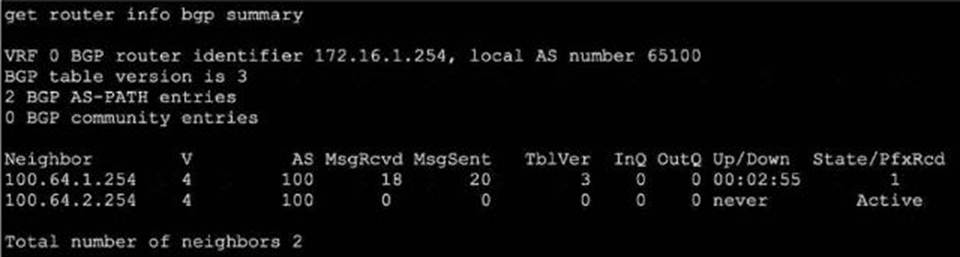
Which two statements are true? (Choose two.)
A. The local ForliGate has received one prefix from BGP neighbor 100.64.1.254.
B. The TCP connection with BGP neighbor 100.64.2.254 was successful.
C. The local FortiGate has received 18 packets from a BGP neighbor.
D. The local FortiGate is still calculating the prefixes received from BGP neighbor 100.64.2.264
Explanation:
The get router info bgp summary output lists BGP neighbor status:
Prefix Reception: The " State/PfxRcd " column shows the number of prefixes received from the neighbor― neighbor 100.64.1.254 has " 1 ", confirming option A.
Received Message Count: Under " MsgRcvd ", 18 packets have been received from neighbor 100.64.1.254.
This matches option C.
The second neighbor 100.64.2.254 is in " Active " state and has received/sent 0 packets, indicating that its TCP connection is NOT established, disproving option B.
There is no indication anywhere that the router is " still calculating " prefixes; " Active " just means no session is established, so option D is incorrect.
References:
FortiOS BGP Command
Reference: BGP Neighbor States, PfxRcd, and Counters
Question#2
Which two statements about Security Fabric communications are true? (Choose two.)
A. FortiTelemetry and Neighbor Discovery both operate using TC
B. The default port for Neighbor Discovery can be modified.
C. FortiTelemetry must be manually enabled on the FortiGate interface.
D. By default, the downstream FortiGate establishes a connection with the upstream FortiGate using TCP port 8013.
Explanation:
FortiTelemetry is a critical part of Security Fabric communications and requires explicit configuration for each participating FortiGate interface. The administrative access setting " fabric " (corresponding to FortiTelemetry) must be manually enabled per interface on both upstream and downstream devices. This is performed in the GUI under Administrative Access or via the CLI using the command set allowaccess fabric for the relevant network interface. Without this step, FortiTelemetry communications will not occur on that interface.
Additionally, the default communication between downstream and upstream FortiGate units in the Security Fabric is over TCP port 8013. This port is well-documented as the standard for Security Fabric and FortiTelemetry connections, and must be open and permitted across the network path for connectivity and status enforcement between units. The downstream FortiGate initiates the connection to the upstream via this port unless otherwise configured. This has also been documented as a PCI-relevant port, showing its default usage.
Other options:
Neighbor Discovery in FortiOS uses IPv6 ND protocol, not TCP.
FortiTelemetry port (8013) can be modified, but the interface Administrative Access for the Security Fabric must be manually enabled; Neighbor Discovery port modification is not documented as a supported change for FortiGate.
References:
FortiGate/FortiOS Administration Guide: Enabling FortiTelemetry (fabric) on interfaces
Fortinet Technical Tip: FortiTelemetry uses TCP port 8013 by default
PCI compliance documentation on port 8013 usage for Security Fabric
Fortinet Security Fabric setup procedures and interface options
Question#4
Refer to the exhibit, which shows the output of diagnose sys session list.
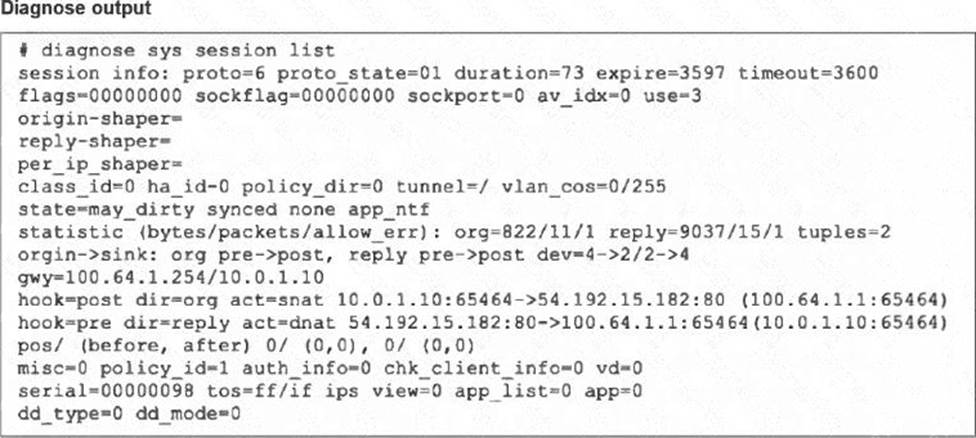
If the HA ID for the primary device is 0, what happens if the primary fails and the secondary becomes the primary?
A. The secondary device has this session synchronized; however, because application control is applied, the session is marked dirty and has to be re-evaluated after failover.
B. Traffic for this session continues to be permitted on the new primary device after failover, without requiring the client to restart the session with the server.
C. The session will be removed from the session table of the secondary device because of the presence of allowed error packets, which will force the client to restart the session with the server.
D. The session state is preserved but the kernel will need to re-evaluate the session because NAT was applied.
Explanation:
The decisive session-state flag is synced. Fortinet defines this flag as indicating that the session has been synchronized to the other HA members. The session was created on HA member 0, and a synchronized copy is available to the secondary device.
The FortiOS 7.6 Administrator Study Guide states: “When you enable session synchronization, the new primary can resume communication for sessions after a failover event.” It further explains that session pickup allows existing sessions to continue through the newly elected primary with minimal or no interruption.
Therefore, the established TCP session remains usable, and the client does not need to establish a new connection.
The may_dirty flag does not mean that the session is currently dirty. It identifies an allowed session that can be marked dirty later if a firewall-policy, routing, or related configuration change requires re-evaluation. The output does not contain the separate dirty flag. Additionally, app_ntf represents block-notification handling; it does not prove that application control is inspecting the session. The fields app_list=0 and app=0 reinforce this.
The allow_err values are session statistics and do not cause session deletion. Although act=snat and act=dnat confirm NAT, the translation tuples are part of the synchronized session state and do not independently require re-evaluation after FGCP failover.
References: High Availability C Cluster Synchronization and HA Failover, pages 456 and 463; Fortinet: HA
session failover; Fortinet: Session-table information.
Question#5
Refer to the exhibit.
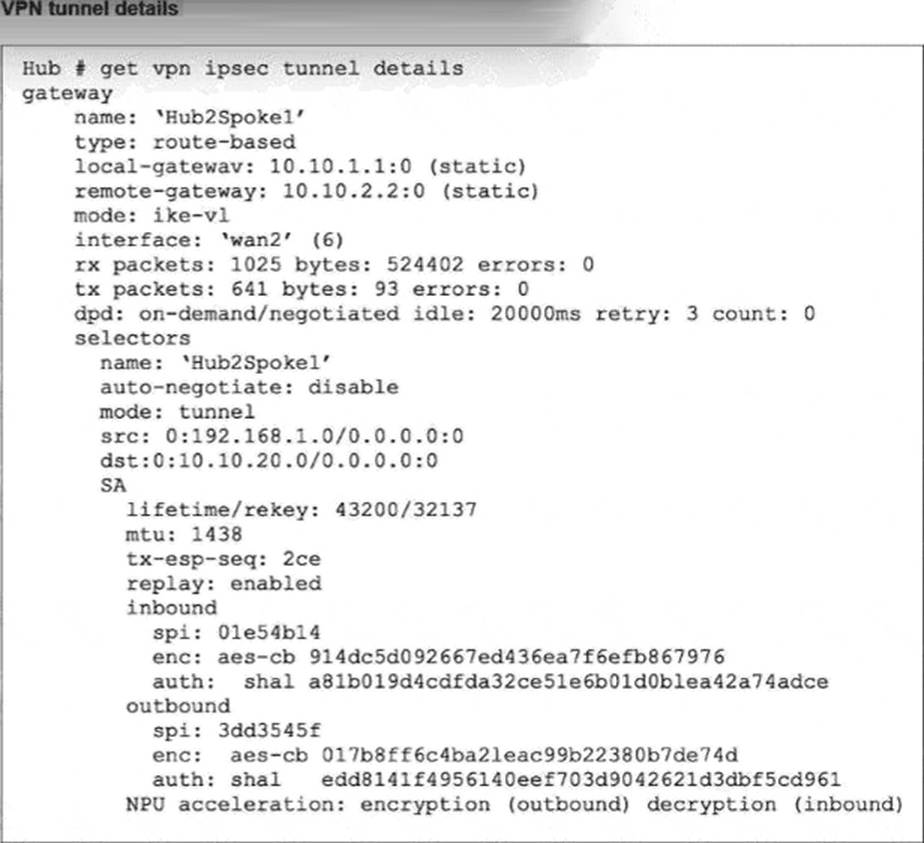
Partial output of the get vpn ipsec tunnel details command is shown. Based on the output, which two statements are correct? (Choose two.)
A. The npu_flag for this tunnel is 02.
B. Different SPI values are a result of auto-negotiation being disabled for phase2 selectors.
C. The npu_flag for this tunnel is 03.
D. Anti-replay is enabled.
Explanation:
The correct answers are C and D.
The study guide’s get vpn ipsec tunnel details example shows:
replay: enabled inbound and outbound sections with separate SPIs
NPU acceleration: encryption(outbound) decryption(inbound) and it labels these as “Phase 2 SAs for each direction” and “Hardware acceleration”
This directly proves D. Anti-replay is enabled, because the output explicitly says replay: enabled
For the NPU status, the study guide explains the exact npu_flag meanings:
npu_flag=00 = both IPsec SAs loaded to the kernel npu_flag=01 = outbound IPsec SA copied to NPU
npu_flag=02 = inbound IPsec SA copied to NPU
npu_flag=03 = both outbound and inbound IPsec SAs copied to NPU
Because the exhibit shows hardware acceleration in both directions ― encryption(outbound) and decryption (inbound) ― the matching npu_flag is 03, not 02. That makes C correct and A incorrect.
Why B is wrong:
The same study guide output labels the tunnel as having Phase 2 SAs for each direction, so different inbound and outbound SPIs are normal for the two SAs. Also, the FortiOS administration guide explains that auto-negotiate controls whether phase 2 SA negotiation is initiated automatically, not whether inbound and outbound SPIs are different: “By default the phase 2 security association (SA) is not negotiated until a peer attempts to send data… Auto-negotiate initiates the phase 2 SA negotiation automatically…”
So the verified answers are: C, D.
Frequently Asked Questions
What is the NSE7_FSN_AR-7.6 exam?
NSE7_FSN_AR-7.6 is the Fortinet NSE 7 – Secure Networking 7.6 Architect exam. It evaluates a candidate’s ability to design, administer, and support secure SD-WAN and enterprise security infrastructures composed of multiple FortiGate devices.
The exam covers advanced FortiGate configuration and operation, FortiManager and FortiAnalyzer integration, security profiles, routing, advanced IPsec, operational scenarios, incident analysis, and troubleshooting.
Who is this NSE7_FSN_AR-7.6 study resource for?
This resource is suitable for:
- Network and security professionals preparing for NSE7_FSN_AR-7.6
- Professionals who design and administer secure SD-WAN solutions
- Engineers who support enterprise environments containing multiple FortiGate devices
- Technical professionals reviewing advanced FortiGate configuration and troubleshooting
Candidates should have practical knowledge of central management, firewall policies, routing, IPsec VPNs, security profiles, and FortiGate troubleshooting.
Are these official NSE7_FSN_AR-7.6 exam questions?
No. CertQueen practice materials are independently created for educational purposes. They are not copied from, recalled from, or presented as Fortinet’s live or official exam content.
Does this resource include answers and explanations?
Yes. The practice questions include answers and explanations designed to clarify relevant Fortinet concepts, configuration decisions, and troubleshooting processes.
Candidates can use the explanations to understand incorrect answers, reinforce important concepts, and identify topics that require additional study.
Can this material guarantee that I will pass NSE7_FSN_AR-7.6?
No preparation resource can guarantee certification results. Your performance depends on your technical experience, preparation strategy, hands-on practice, and understanding of the exam objectives.
For effective preparation, combine this resource with current official Fortinet training materials, product documentation, and practical lab experience.
How often is the content updated?
The material is reviewed periodically and may be revised when Fortinet changes the exam objectives, product features, or related technologies.
Always confirm the current exam requirements through Fortinet’s official training and certification resources.
Are free NSE7_FSN_AR-7.6 sample questions available?
Yes. CertQueen provides a selection of independently developed sample questions so candidates can review the question format, test their current knowledge, and experience the explanation style before exploring the complete preparation material.

